A 30-day checklist closes the gaps once. A continuous maintenance program keeps them closed.
The last few weeks have been some of the busiest in recent security memory. A record-breaking exchange theft that started on developer laptops. A popular editor extension that turned malicious and reached developer machines through auto-update. And a run of critical vulnerabilities in software almost every company runs: the PHP runtime, GitLab, edge appliances, KVM and the Linux TCP stack.
If you haven’t read it yet, Cognition’s practical guide to security in November 2026 is the clearest summary we’ve seen. Its core point is right: almost none of this was new. Unpatched servers, stolen credentials, over-privileged developer machines. AI made attacks faster and cheaper, but the doors were the same ones that have been open for years. The guide’s answer is a list of what to do immediately and what to do within 30 days.
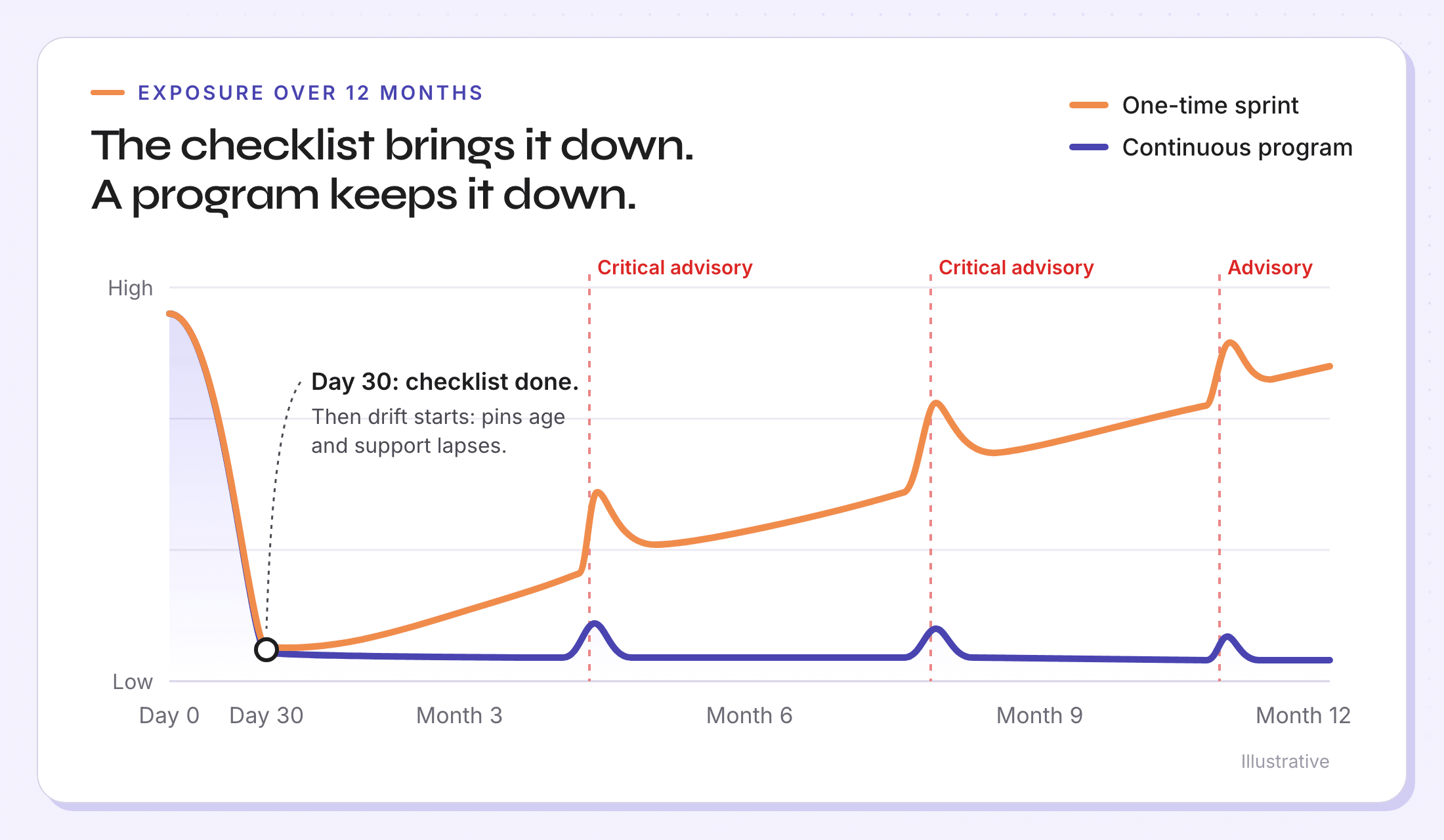
Do the list. Then ask the harder question: what happens on day 31?
Every item on the list starts to drift the day you finish it
Security checklists are written as projects. Your environment doesn’t behave like one.
- The extension allowlist is accurate the day you publish it. Within a quarter, teams have asked for a dozen exceptions, two approved extensions have changed hands, and nobody has rechecked either.
- Pinned versions and lockfiles stop surprise updates, which is exactly what you want this month. Left alone, they also stop the updates you need. Six months later, the pinned version is the vulnerable one.
- A minimum package age buys time to spot a poisoned release. It also makes every dependency update deliberate, so someone has to make those updates on a schedule.
- The attack surface audit is a snapshot. New services, new edge appliances and new cloud accounts show up every week.
- The secrets you rotate today reappear next month in a new repository, image or laptop.
None of this is an argument against the checklist. It’s an argument that the checklist is the first lap of something that doesn’t end.
Your patch time was set before the advisory dropped
Here’s the part of the November story that gets less attention. When a critical CVE lands, your mean time to remediate isn’t set by how quickly the security team triages the advisory. It’s set by how far behind you already were.
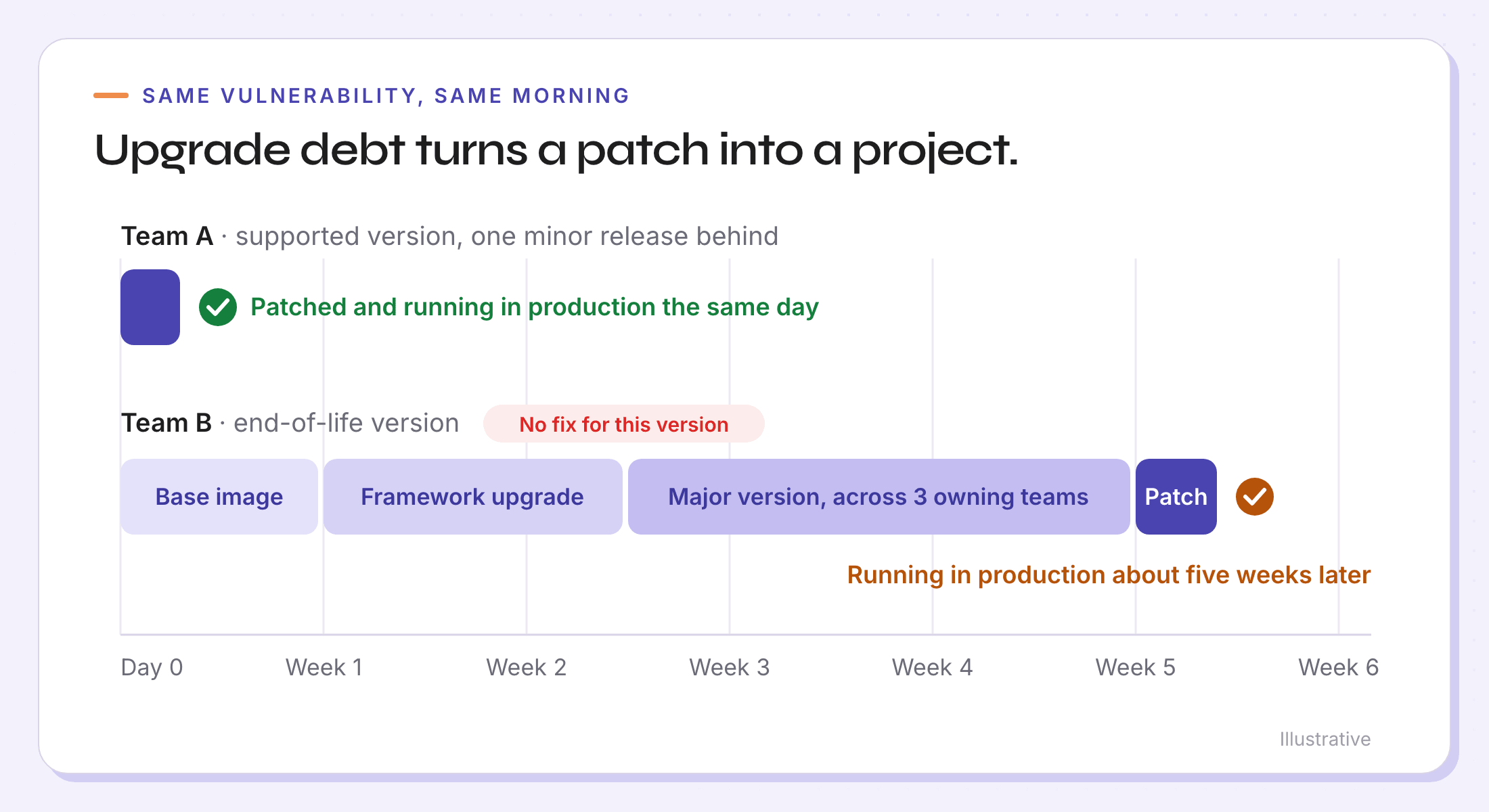
Take two teams hit by the same runtime vulnerability on the same morning.
Team A runs a supported version, one minor release behind. The vendor ships a fix. They bump the version, run their tests and roll it out the same day.
Team B runs a version that left support last year. There is no fix for their version, and there won’t be one. Before they can patch, they have to upgrade: a base image that pins the old runtime, a framework that has to move first, a new major version, and a handful of services owned by a team that reorganized in the spring. The patch itself is a one-line change. Getting to the point where they can apply it takes weeks.
Same CVE, same advisory, same scanner finding. The difference is upgrade debt. Upgrade debt turns every patch into a project, and you find out how much of it you carry on the day you can least afford to.
This is also why end-of-life software deserves more weight than its CVE count suggests. Once a component leaves support, every future vulnerability in it is one you’ll fix by migrating, not patching. Edge appliances are the sharpest example: firmware that has fallen off the vendor’s support list is exactly where well-funded attackers keep looking.
Findings are scaling. Remediation has to scale with them.
The guide closes with a line every security leader should take literally: new CVEs will keep coming, and frontier models will find them faster. Attackers are using those models. So are researchers, vendors and bug bounty hunters. More findings mean more advisories, more patches and more upgrades, arriving at a steadier pace than any team has staffed for.
Most security teams already have strong detection. Scanners across cloud, code, containers and dependencies surface what’s vulnerable within hours. The bottleneck is everything after the finding: figuring out the fix path, finding the owner, getting the change shipped and proving it’s done. That’s where backlogs grow and remediation SLAs slip.
You can’t sprint your way through a stream. When findings are continuous, the only thing that scales is a maintenance program: a standing way of knowing what you run, how far behind it is and who owns it, with continuous patching that gets fixes into production without a fire drill each time.
What a continuous maintenance program looks like
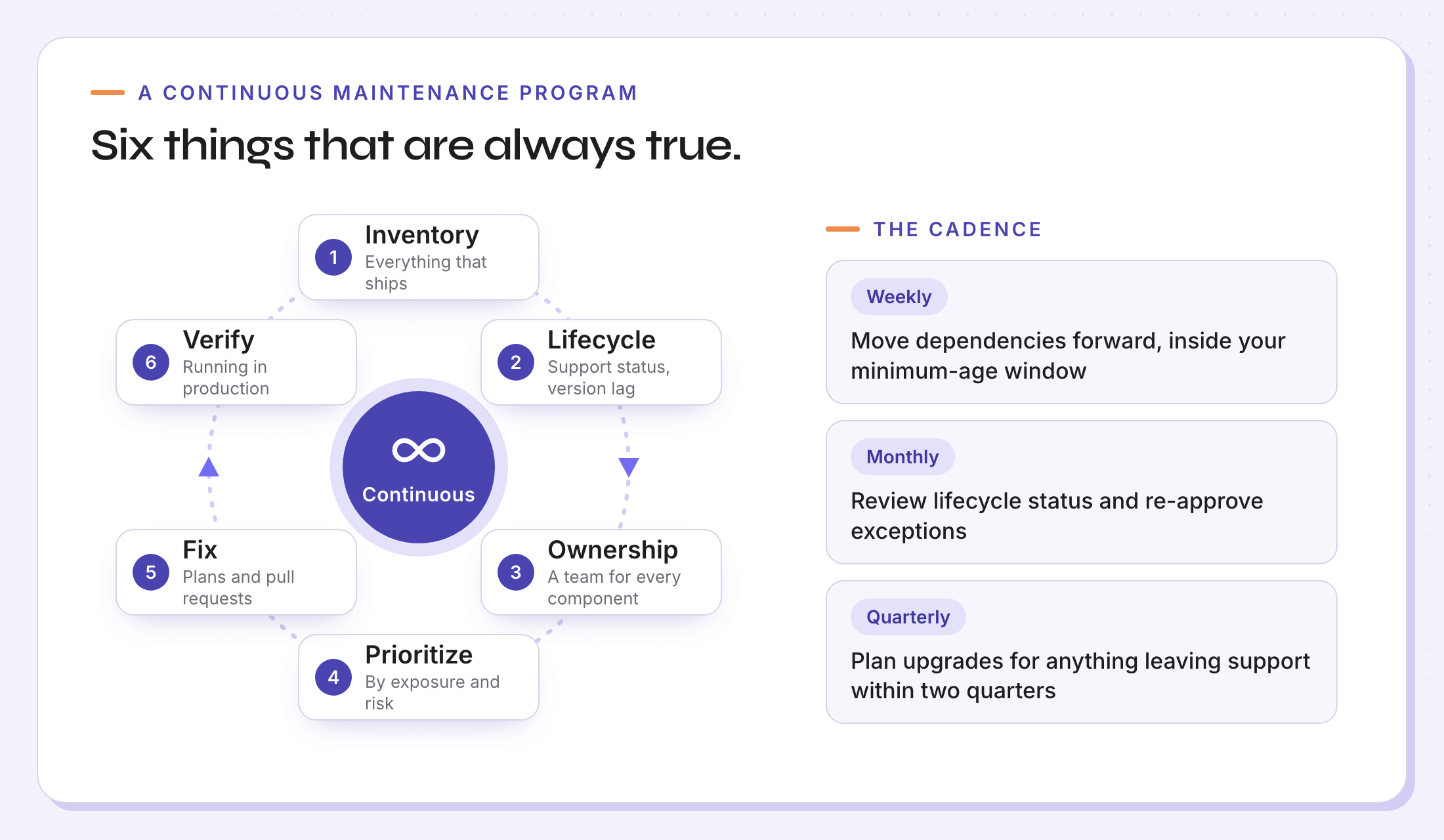
A program isn’t a bigger checklist. It’s a short set of things that are always true, plus a cadence that keeps them true.
1. A live inventory of everything that ships. Not just application dependencies: runtimes, container images, databases, Kubernetes add-ons, edge appliances, certificates, editor extensions, MCP servers and coding agents. If a critical advisory drops tomorrow, you should be able to answer in minutes, not days: where do we run this, on which versions, and how much of it is internet-facing?
2. Lifecycle position for every component. A version number isn’t enough. You need to know where each version sits in its vendor’s support lifecycle, how far it is from the latest fixed release and when it will fall out of support. That’s what tells you whether the next fix is a patch or a project.
3. An owner for every component. A finding without an owner is a Slack thread. Map every service, image and appliance to the team that changes it, so the fix lands somewhere the moment it exists.
4. Remediation SLAs by exposure. Not every finding is equal. Set target windows by what’s at stake: internet-facing systems and anything that handles authentication, payments or customer data move first, while isolated internal tools can wait for the regular cadence. Write the SLAs down and report against them.
5. Agentic patching, with guardrails. Coding agents can now write most of the fix, but an agent with no context is a fast way to open pull requests nobody merges. Give agents the upgrade path, breaking changes, prerequisites and owner up front, and let your policy decide what ships on its own and what needs approval. Routine patches flow continuously. Risky upgrades get a plan and a human.
6. Proof that the fix is running. A merged pull request isn’t a closed finding. Done means the fixed version is running in production and the vulnerable one is gone. Measure exposure eliminated, not tickets closed.
And a standing cadence behind it: dependency updates every week, inside your minimum-age policy. A lifecycle review every month. Upgrade plans every quarter for anything leaving support in the next two. Exceptions (extensions, pinned versions, risk acceptances) get re-approved on a schedule, or they expire.
Turn the 30-day list into controls that stay true
| From the November checklist | What keeps it true after day 30 |
|---|---|
| Audit extensions, plugins and MCP servers | A continuous inventory, an allowlist with owners and exceptions that expire |
| Pin versions and commit lockfiles | Continuous patching: pinned versions moved forward weekly, by an owner |
| Set a minimum package age | Agentic patching pull requests that respect the waiting window |
| Audit your public attack surface | An inventory that picks up new services and appliances as they appear |
| Trim unused and unmaintained dependencies | Lifecycle and maintainer health tracked per dependency, reviewed monthly |
| Scan for secrets and rotate what you find | Scanning in CI and on images, with rotation owned by the service team |
| Plan refactors of critical codebases | Upgrade and migration plans with owners and sequencing, and progress you can see |
Measure the program, not the sprint
A handful of numbers tell you whether the program is working:
- Share of production on supported versions. The best single predictor of whether your next critical fix is a patch or a project.
- Version lag on critical components. How far behind the latest fixed release you are, on average and at worst.
- Mean time to remediate critical, internet-facing findings. Measured to running in production, not to merged.
- SLA attainment by severity and exposure. The share of findings fixed inside their target window.
- Ownership coverage. The share of components with a named team.
- Components leaving support in the next two quarters, and how many of them already have a plan.
If those numbers improve quarter over quarter, the next wave of advisories is a busy week instead of a crisis.
Where Draftt fits, even if you already have a scanner
Most security teams we talk to already run good scanners across cloud, code and containers. Draftt doesn’t replace them. It picks up where they stop.
Your scanners tell you what’s vulnerable. Draftt’s MaintenanceOS™ answers what happens next, continuously:
- Context the scanner doesn’t have. Where each affected component sits in its lifecycle, whether the fix is a patch or an upgrade, what has to move first, and which team owns it.
- Prioritization by real exposure. Findings ranked by what’s internet-facing, what’s out of support and what it costs to wait, not by CVSS alone.
- Agentic patching with guardrails. Fixes delivered as upgrade plans and pull requests, handed to your coding agents with the full context, and shipped under the approval policy you set.
- Verification in production. A finding closes when the fixed version is actually running, which is the evidence your auditors and your board want to see.
Your scanners, coding agents and ticketing tools stay where they are. Draftt turns their output into a continuous maintenance program, with agentic patching built in.
Do the checklist this month. Then put a program behind it, so next time you’re not starting from scratch.
